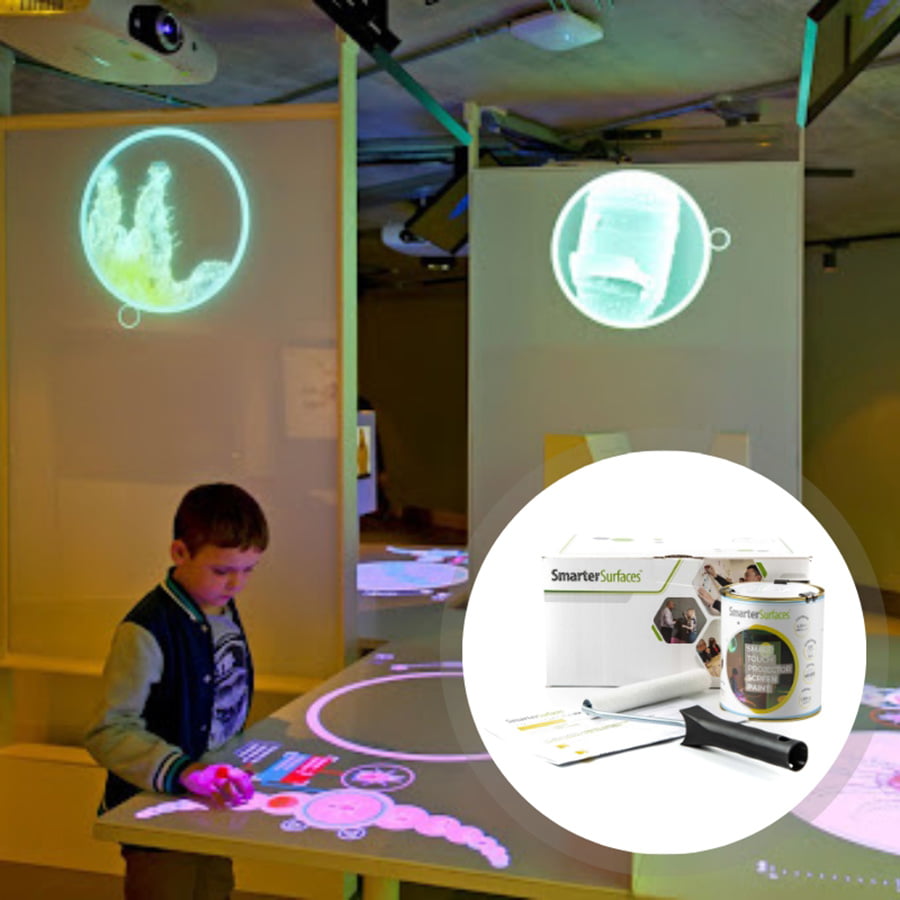
Delivery InformationVolume DiscountsTechnical SpecificationsCustomer ReviewsInstallationBenefits of Using Smart Interactive Projector Screen PaintInteractive Learning and CollaborationSmart Interactive Projector Screen Paint allows you to create an interactive projection screen for immersive learning and collaboration experiences that can be touched by hands and will not stain or damageIdeal for high usage levelsThe paint is touch-resistant and highly cleanable, making it suitable for classrooms, offices, and meeting rooms where multiple users can interact on a consistent basisOptimized for Interactive Touch Screen ProjectorsSpecifically designed to work seamlessly with interactive touch screen projectors.Maximum Pixel Definition and ClarityEnhances pixel definition and image clarity for projectors with a lumen rating above 1,000, delivering clear, sharp, and bright images for effective work and collaboration.Seamless and Hassle-Free Application The Smart Interactive Projector Screen Paint is easy and quick to apply, offering a spectacular projection surface without the need for bulky screens. It can be applied to any smooth surface.For Use WithProjector Requirements: Interactive ProjectorsMinimum Recommended Lumen Value: 1,000 LumensLighting: works in rooms with normal to high levels of ambient lightCompatible Surfaces: can be applied to fabrics and is suitable for painting or refurbishing old screens, but not suitable for roll-up screens.Interactive Projector Screen Paint – Performance4K & 8K Ultra HD ReadyGain Value @ 90 °: 1.25Viewing Angle: 140 degreesCertification: Independent Projection Performance Report – CRESTComparison TableCompare the performance and specifications of our full projection rangeView Comparison TableInteractive Projector Screen Paint - Technical SpecificationsColour: White Finish: Matt Screen Size:4.5 m2 : 120” / 320cm at 16:9 Aspect Ratio25 m2 : 301"" / 764.5cm at 16:9 Aspect RatioVolume:4.5 m2 : 880ml25 m2 : 5lCoverage: 4.5 m2 : 279 x 157 cm at 16:9 Aspect Ratio25 m2 : 667 x 375 cm at 16:9 Aspect RatioEnvironmental (exceeds all Irish standards): low VOC, solvent free, PFOA & PFOS free and isocyanates free Odour: Very Low VOC: Less than 0.39% Certification: Independent Projection Performance Report – CREST, Gypsum Surface Finish Quality Standard of EU Level Q4Confused with the myriads of options? Well, let us steer you in the right direction. Connect with us via video call, live chat, phone, or email for expert advice and personalised recommendations that are completely free of charge. Worried about installation? We have got your back with our step-by-step guidance and assistance to ensure a smooth and hassle-free setup.Kit Contents 4.5 m2Smart Interactive Projector Screen PaintWhite Primer TinRoller HandleRoller SleeveStirring StickApplication GuideKit Contents 25 m2Smart Interactive Projector Screen PaintApplication GuideSmart Interactive Projector Screen Paint ReviewsMD - Camden EventsThis interactive projector screen paint was perfect for creating interactive projection displays for our exhibition. It made the displays pop and was easy to clean with no effect on the surfaces. People could touch the surface and see the image interact with them.Des Ball - 6th Year Malahide Christian BrothersSmart Interactive Projector Screen Paint allowed us to create seamless interactive projection screens in our classrooms. Our decorators said it was an easy application.J Ryan - 6th FormLove painted screens, we use the interactive projection screens in a few of our classrooms with the interactive projectors and a very cool teaching wall.Explore More Products From Smarter Surfaces(0 Reviews)Smart Ultra High Contrast Projector Screen Paint From €219.00 ex.VAT Select options This product has multiple variants. The options may be chosen on the product page (0 Reviews)Short Throw Projector Screen Paint From €159.00 ex.VAT Select options This product has multiple variants. The options may be chosen on the product page (1 Reviews)White Projector Screen Paint Pro From €199.00 ex.VAT Select options This product has multiple variants. The options may be chosen on the product page (0 Reviews)Magnetic Projector Screen Whiteboard Wallpaper From €261.00 ex.VAT Select options This product has multiple variants. The options may be chosen on the product page FAQ's What lighting works best with Smart Interactive Projector Screen Paint?Smart Interactive Projector Screen Paint performs optimally in environments with normal to high ambient lighting, ensuring clear and vibrant projections. Where can Smart Interactive Projector Screen Paint be applied?Designed for interactive projection, our paint is ideal for classrooms, offices, and meeting spaces. It blends seamlessly with touch screen projectors and offers durability against touch, stains, and easy cleaning. Why are Smart Projection Paints Acoustically Transparent?The Sound Absorption Coefficient (SAC) measures how much sound a material absorbs when sound waves pass through it. In our testing, we assessed a standard 12mm gypsum board, a widely used construction material.SAC values vary with sound wave frequency, as different wavelengths interact uniquely with materials. Our test results showed:Unpainted Board α = 0.04-0.07 Painted Board α = 0.04-0.07Since these values remain unchanged after painting, our Smart Projection Paints maintain the acoustic properties of the original surface, ensuring they do not interfere with sound transmission. What makes Smart Interactive Projector Screen Paint ‘Polarity Preserving’?3D projectors create depth by displaying two slightly offset images with different light polarisation. Special 3D glasses filter these images so that each eye perceives the correct projection, forming a 3D effect.For accurate 3D visuals, the projection surface must maintain the original light polarity. Our paints are specifically designed to be "polarity preserving," ensuring that the projected image retains its intended characteristics without distortion. Is Smart Interactive Projector Screen Paint suitable for blended projections?Blended projections are widely used in theatres, exhibitions, and large-scale displays to create seamless visuals. The quality of the projection surface is crucial for achieving smooth transitions and uniform brightness.Our projector screen paint is engineered to support multi-projector blending by providing consistent colour accuracy, excellent light diffusion, and a flawless finish. Unlike traditional bulky projection screens, it offers a flexible and cost-effective alternative for large-scale projections, transforming any surface into a continuous digital display. Can Smart Interactive Projector Screen Paint be used with both 2D and 3D projectors?Yes, our projector screen paint is compatible with both 2D and 3D projectors. When used with a 3D projector, it ensures optimal image clarity and depth, preserving the immersive effect when viewed with 3D glasses. What does gain mean in projector screens?Gain measures how effectively a projection surface reflects light. It indicates the screen’s ability to enhance brightness compared to a standard matte white surface with a gain of 1.0.A higher gain reflects more light, producing a brighter image but narrowing the viewing angle. Conversely, a lower gain provides a wider viewing angle but results in a dimmer display.Choosing the right gain primarily depends on factors such as projector brightness, ambient lighting, screen size, and seating arrangement to ensure the best visual experience. Why is gain a crucial factor in projector screens?Gain influences both image brightness and viewing angles. It determines how well light is reflected, directly affecting clarity and visibility from different positions. Does a higher gain guarantee better picture quality?Not necessarily. While a high-gain screen increases brightness when viewed head-on, it can lead to uneven illumination at wider angles. The higher the gain, the narrower the optimal viewing range. How do I choose the right gain for my setup?A gain of 1.0 offers balanced brightness and wide visibility, making it a standard choice. However, the best option depends on your environment, projector strength, and audience layout. Weigh the benefits and trade-offs of high and low-gain screens to find the ideal match. What are the advantages of high-gain screens?Following are the advantages of high-gain screens : • Enhanced brightness in well-lit spaces. • Improved contrast in darker environments. • Minimal reflection from walls and ceilings. • Reduced ambient light interference. What are the drawbacks of high-gain screens?Following are the major drawbacks of high-gain screens : • Narrower viewing angles, limiting visibility for off-centre viewers. • Requires a direct line of sight for optimal brightness. • Less effective for large audiences. • Unsuitable for outdoor viewing. What benefits do low-gain screens offer?Following are the major benefits of low-gain screens : • Wider viewing angles, ideal for larger groups. • Even light distribution across the screen. • Softer brightness, making them well-suited for indoor use. What are the limitations of low-gain screens?Following are the limitations of low-gain screens : • Lower brightness levels, making them less effective in outdoor settings. • Reduced ability to reflect projector light efficiently. • May struggle to maintain strong contrast in certain lighting conditions. Is Smart White Projector Screen Paint Pro suitable for blended projections?Yes, absolutely. Whether used for artistic displays, theatre productions, or large-scale presentations, our projector paint is designed for seamless image blending.With its superior colour accuracy, consistent brightness, and excellent light diffusion, it ensures smooth transitions between overlapping projections. Unlike bulky physical screens, our paint offers a cost-effective, space-saving alternative, turning any surface into a unified projection display. Does Smart White Projector Screen Paint Pro support both 2D and 3D projections?Yes, our paints are fully compatible with both 2D and 3D projectors. When used with 3D glasses, they preserve the depth and clarity required for an immersive viewing experience, ensuring that projected visuals appear as intended. How do I apply Smart Interactive Projector Screen Paint?You can apply it using a roller or spray. Ensure the surface is clean, dry, and free from debris. Mark the area with masking tape, fill any imperfections with decorator’s filler, and sand until smooth. Apply two coats of Smart White Primer, sanding lightly between layers. Stir the paint thoroughly, then use a mohair or lint-free short pile roller to apply two coats, allowing the first coat to fully dry before adding the second. Which surfaces are suitable for Smart Interactive Projector Screen Paint?This paint adheres well to smooth surfaces such as plaster, wallboards, wood, metal, concrete, and composites. It is designed for indoor use only. Should I prime the surface before applying Smart Interactive Projector Screen Paint? Yes, for best results, apply it to a primed or previously painted surface. Bare or untreated surfaces should be coated with Smart White Primer before application. Is Smart Interactive Projector Screen Paint safe to use? Absolutely. It is low in VOCs, free from solvents, PFOA, PFOS, and isocyanates, making it a safe choice. We recommend wearing the gloves provided while applying. Does Smart Interactive Projector Screen Paint contain isocyanates?No, it is entirely free from isocyanates. Unlike some lower-quality alternatives, our paint is formulated without these hazardous chemicals, ensuring safety without compromising performance. What protective gear should I wear when applying the paint?Use the gloves included in the kit and wear safety glasses for additional protection. As with any painting process, ensure the room is well-ventilated. Is Smart Interactive Projector Screen Paint flammable?No, it is non-flammable and fire-rated, making it a safe option for use in schools, offices, and other professional spaces. It has a high flashpoint exceeding 158°F. Can I apply Smart Interactive Projector Screen Paint in occupied spaces?Yes, it is safe for use around both adults and children. As a low-odour, VOC-free formula without isocyanates, it poses no harm when applied in shared environments. How do I remove paint from my skin?If it comes into contact with your skin, simply wash the area with warm, soapy water. What should I do if I spill the paint?Well, just promptly clean up spills promptly using water. How do I maintain my Interactive Projector Screen Paint?You can keep your surface clean by wiping it with a dry or slightly damp cloth. For tougher marks, use the Smarter Surfaces Everyday Cleaner for best results. Smart Interactive Projector Screen Paint InstallationSmart Interactive Projector Screen Paint is compatible with surfaces such as plaster, wallboards, wood, metal, concrete, and composites. Designed for indoor use only.Begin by measuring the desired area and outlining it with masking tape. This paint provides coverage up to 279 cm x 157 cm (109.8” x 61.8”).Start with two coats of Smart White Primer (included in the kit), lightly sanding between applications. Once fully dry and the surface is smooth, apply two coats of Smart Interactive Projector Screen Paint.For detailed instructions, refer to our step-by-step Application Guide.Interested in testing our products first? Well, then simply request a sample pack.If you have any questions or need assistance, our team is always happy to help. Get in touch with us today and we'll be more than happy to assist you. A full application guide to help you apply our Interactive Projector Screen Paint.Smart Interactive Projector Screen Paint installation VideoWatch our step-by-step Video Application GuideSmart Interactive Projector Screen Paint Videos Watch our step-by-step Video Application Guide Whiteboard Paint White for Education Whiteboard Paint White Case Study
Related products
Sale!
Select options
This product has multiple variants. The options may be chosen on the product page